02 | Notification Center 2.0
Real Time Alarm Notifications
& Configuration for Mining Operations
MetricsManager Pro is a central platform for tracking mining equipment, offering summaries, performance reports, and access to activities from any location. I was assigned to build a notification center for alarms for all products, including shovels, trucks, belts, and loaders.
Wear Monitoring is a real-time solution that tracks shovel tooth length and predicts the estimated changeout time.This enables shovel operators at the mine to proactively schedule replacements in advance.
IndustrialUX
Real Time Alerts
Operational Monitoring
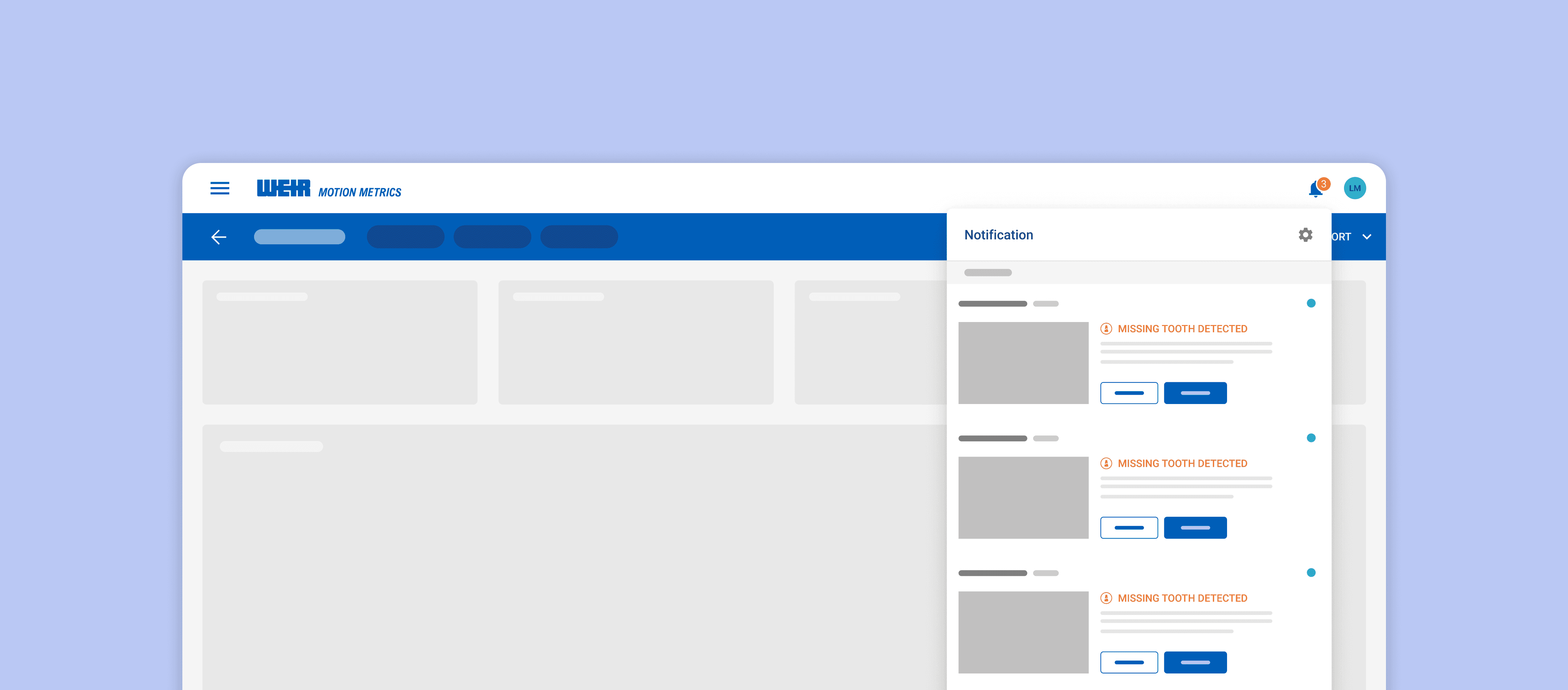
View Notifications of All Products
View Shovel Status in
One Glance
The notification center allows users to quickly access all product alarms and confirm them when needed. If they want to view specific products, they can easily use the available filtering options.
The notification center allows users to quickly access all product alarms and confirm them when needed. If they want to view specific products, they can easily use the available filtering options.
Configure Notifications for Individual Systems
You can easily set alarm notifications on any page in the system to see which products are linked to each system.
This method allows you to turn off a system with just one click, improving user efficiency and control.
You can easily set alarm notifications on any page in the system to see which products are linked to each system.
This method allows you to turn off a system with just one click, improving user efficiency and control.
Receive Alarms on Any Page
Push notifications allow users to view important alerts while using any page of the app, ensuring they stay informed and engaged. Users have the option to either confirm or dismiss alarm notifications.
Push notifications allow users to view important alerts while using any page of the app, ensuring they stay informed and engaged. Users have the option to either confirm or dismiss alarm notifications.
CHALLENGE
Allow Users to Receive Alarms Anytime, Anywhere
In the mining world, alarms are crucial to prevent any downtime and production cost. How can we allow users to view all the alarms in one centralized location? In this project my focus was to allow users to view all alarms in one place and also allow them to confirm if it is a real alarm or not.
Our key goals for this project were to:
Provide users with a centralized view of all alarms, where they can easily confirm or dismiss them.
Offer flexible notification settings, allowing users to enable or disable alarms for each individual product.
After identifying the problems, I prioritized empathizing with the customer. I created a storyboard based on their key pain points to visually explore potential scenarios and understand their journey better.
My Role
From April to June 2025, I led the end-to-end design of the Notification Center. Throughout the design phase, I collaborated closely with 1 Customer Success representative, 2 Customer Support, and the CLD Director to gather requirements and ensure the designs aligned with both customer needs and business goals.
After identifying the problems, I prioritized empathizing with the customer. I created a storyboard based on their key pain points to visually explore potential scenarios and understand their journey better.
During development, I worked closely with a front-end developer to refine interactions, address technical constraints, and validate that the final experience matched the design intent.
After identifying the problems, I prioritized empathizing with the customer. I created a storyboard based on their key pain points to visually explore potential scenarios and understand their journey better.
CONTEXT
Current Notification Center
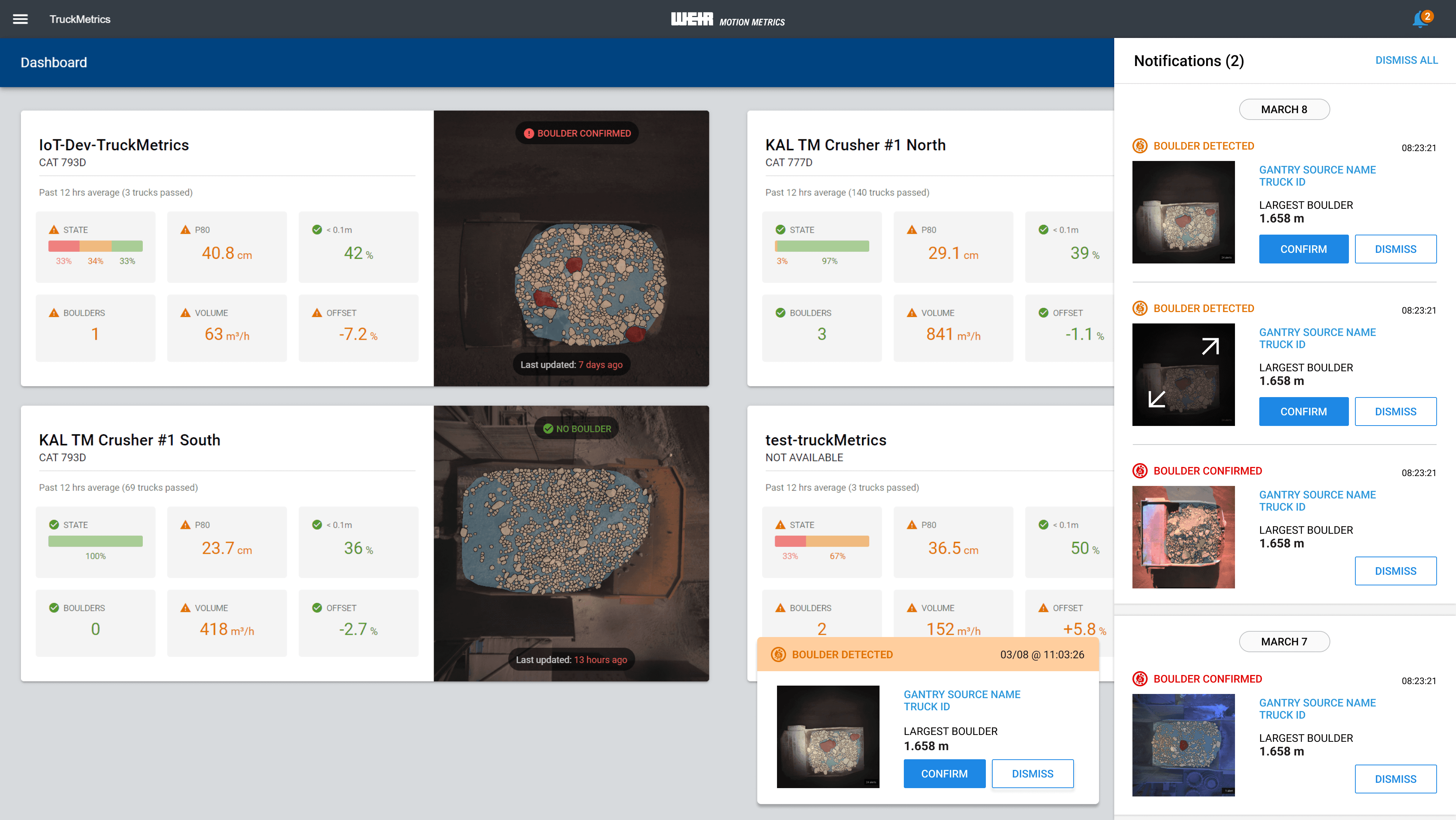
Alarms play a critical role in mining equipment, including loaders, shovels, and trucks. In the existing implementation, however, only trucks had a notification center, while other equipment relied solely on audio alarms that could be toggled on or off from their product dashboards. Customers requested a centralized location where they could view all alarms in one place. Additionally, the design was outdated, misaligned, and not consistent with the design system.
After identifying the problems, I prioritized empathizing with the customer. I created a storyboard based on their key pain points to visually explore potential scenarios and understand their journey better.
RESEARCH
Gathering Requirements
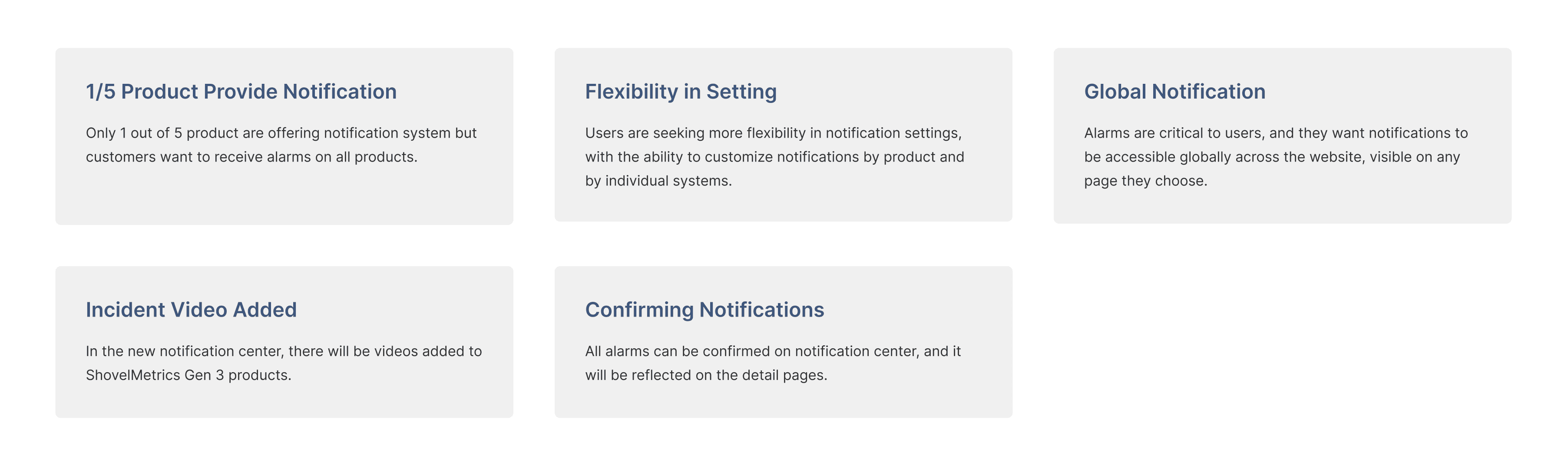
Before beginning the design process, I collected project requirements from our team director and gathered valuable insights from customer support teams who work closely with customers. This helped me identify and prioritize the key pain points that needed to be addressed.
After identifying the problems, I prioritized empathizing with the customer. I created a storyboard based on their key pain points to visually explore potential scenarios and understand their journey better.
RESEARCH
Discovering the Why Behind User Needs
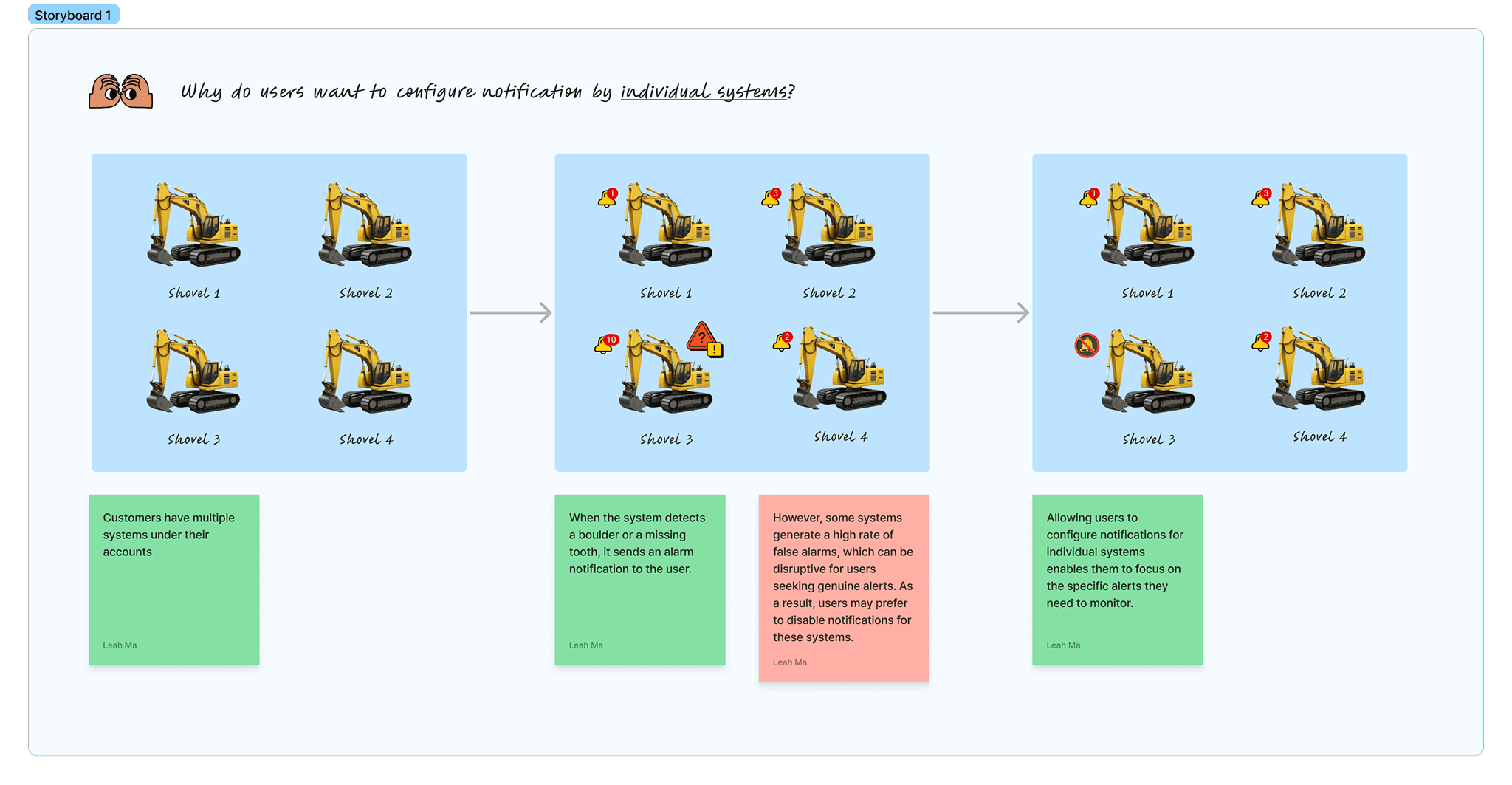
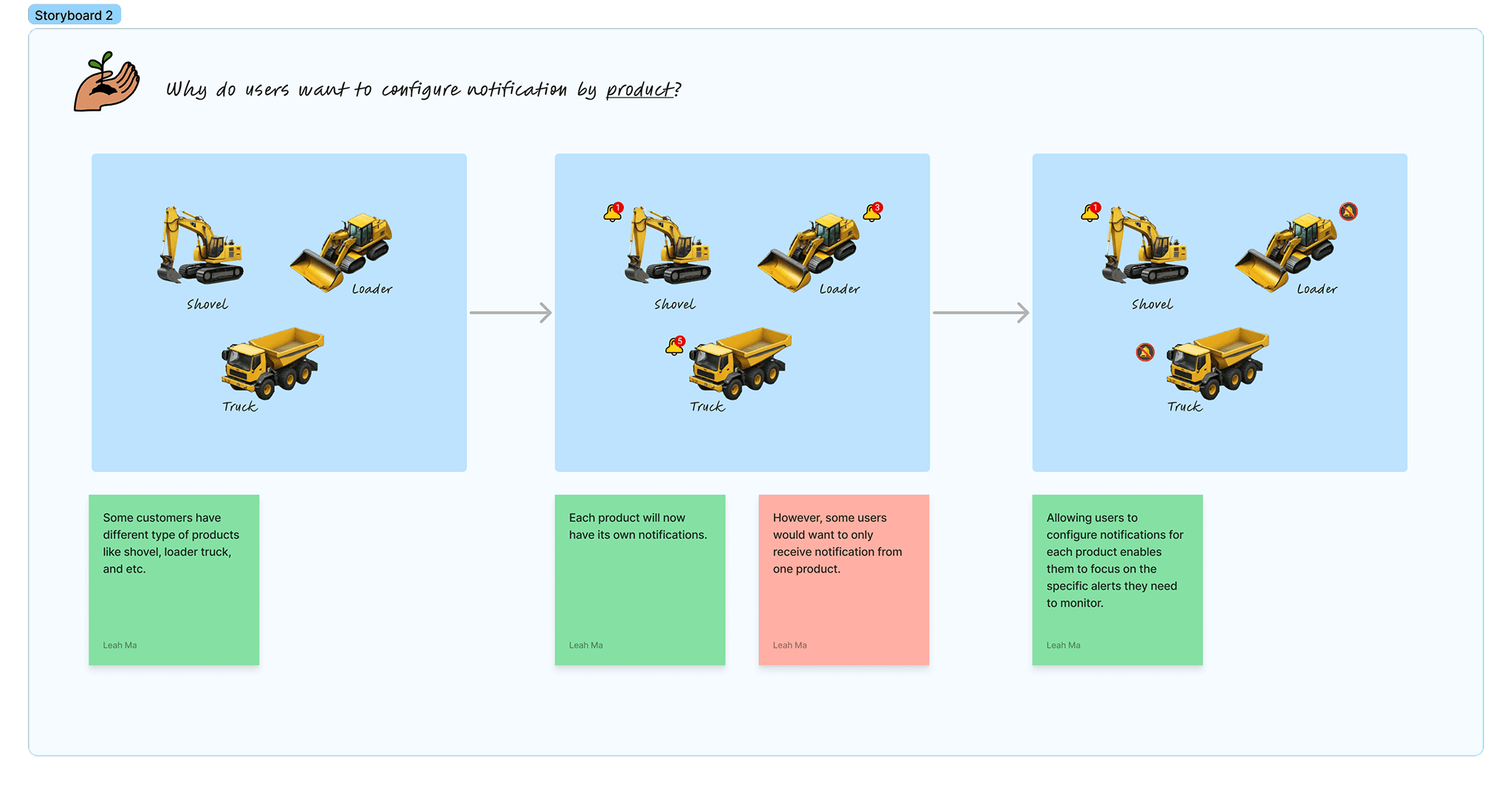
Since users wanted to configure notifications both by individual systems and by product, I set out to understand the situations in which they would need this flexibility. To do that, I created a storyboard that highlights their key pain points and visualizes potential scenarios, allowing me to better understand their journey.
Since users wanted to configure notifications both by individual systems and by product, I set out to understand the situations in which they would need this flexibility. To do that, I created a storyboard that highlights their key pain points and visualizes potential scenarios, allowing me to better understand their journey.
RESEARCH
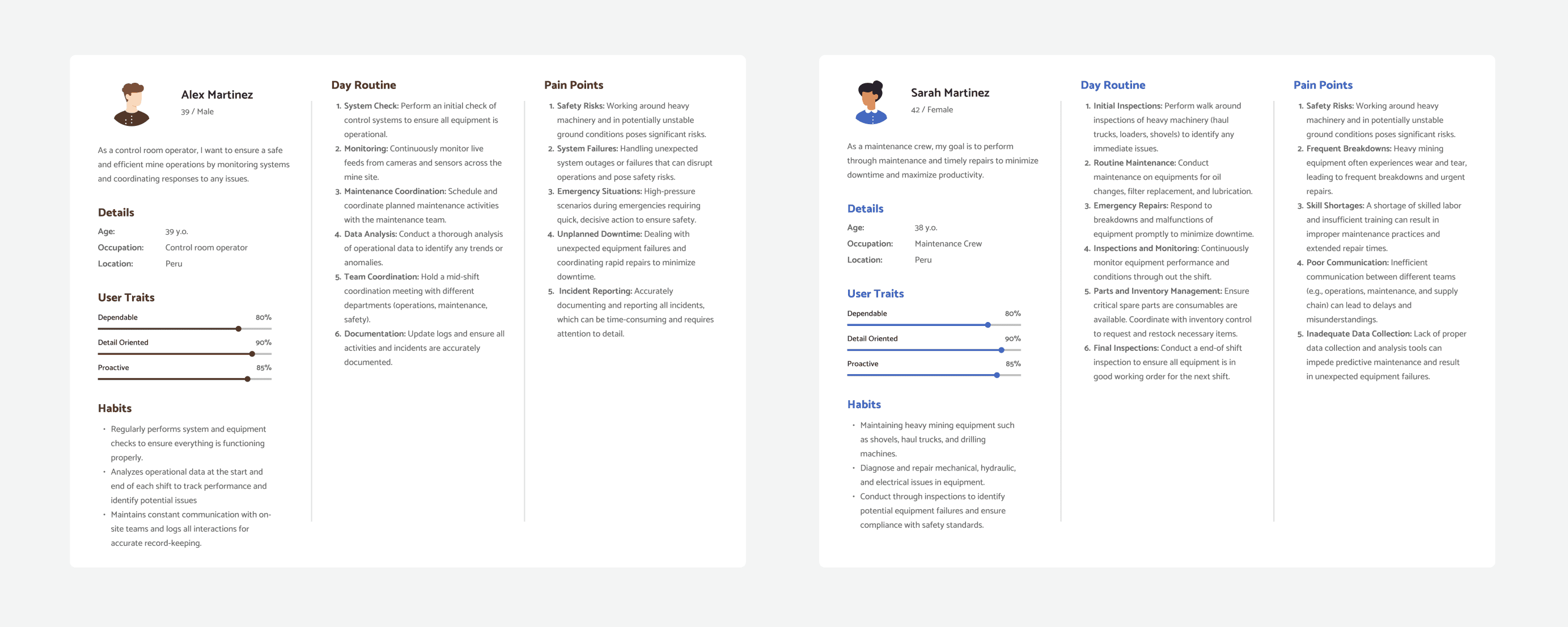
Which User is in Charge of Alarms?
Since users wanted to configure notifications both by individual systems and by product, I set out to understand the situations in which they would need this flexibility. To do that, I created a storyboard that highlights their key pain points and visualizes potential scenarios, allowing me to better understand their journey.
Since users wanted to configure notifications both by individual systems and by product, I set out to understand the situations in which they would need this flexibility. To do that, I created a storyboard that highlights their key pain points and visualizes potential scenarios, allowing me to better understand their journey.
RESEARCH
Looking Into Different Notification Centers
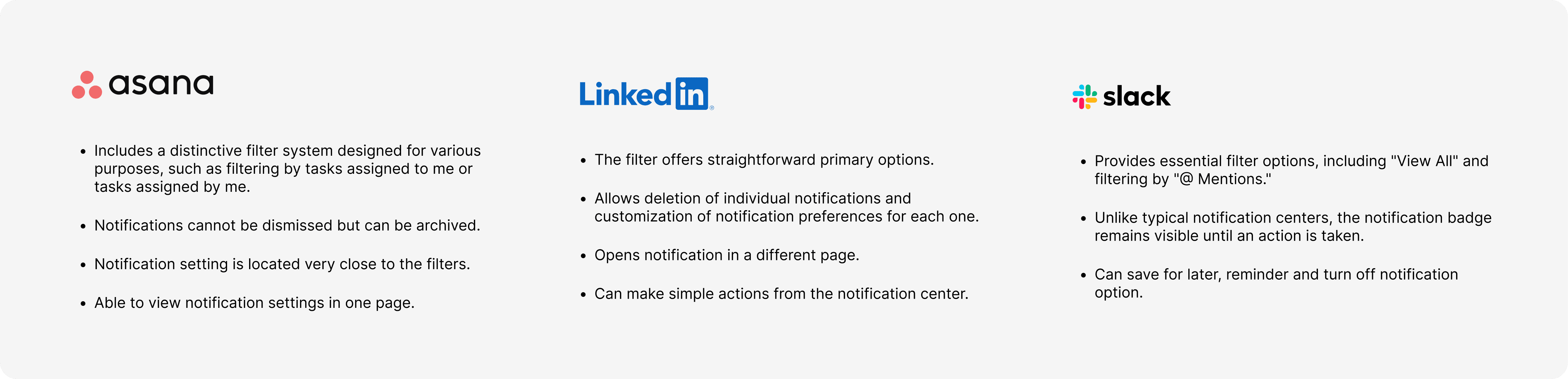
After identifying the problems, I intended to research how competitors' notification systems operate. However, with limited access to other mining platforms, I focused on analyzing the notification systems of platforms readily available to me to explore the overall functionality of notification centers.
After identifying the problems, I intended to research how competitors' notification systems operate. However, with limited access to other mining platforms, I focused on analyzing the notification systems of platforms readily available to me to explore the overall functionality of notification centers.
IDEATE
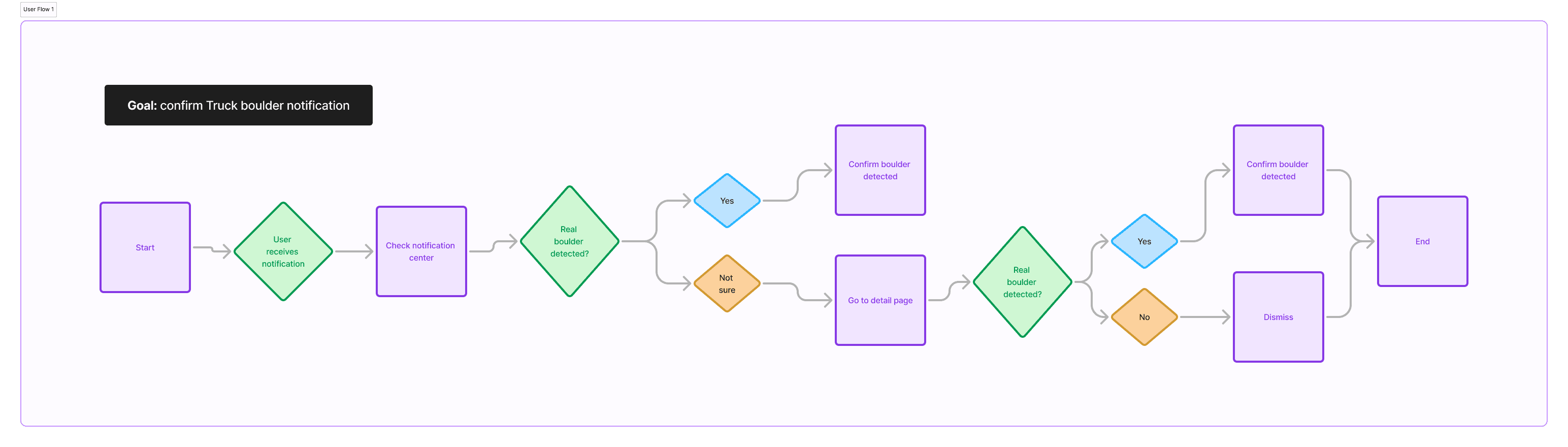
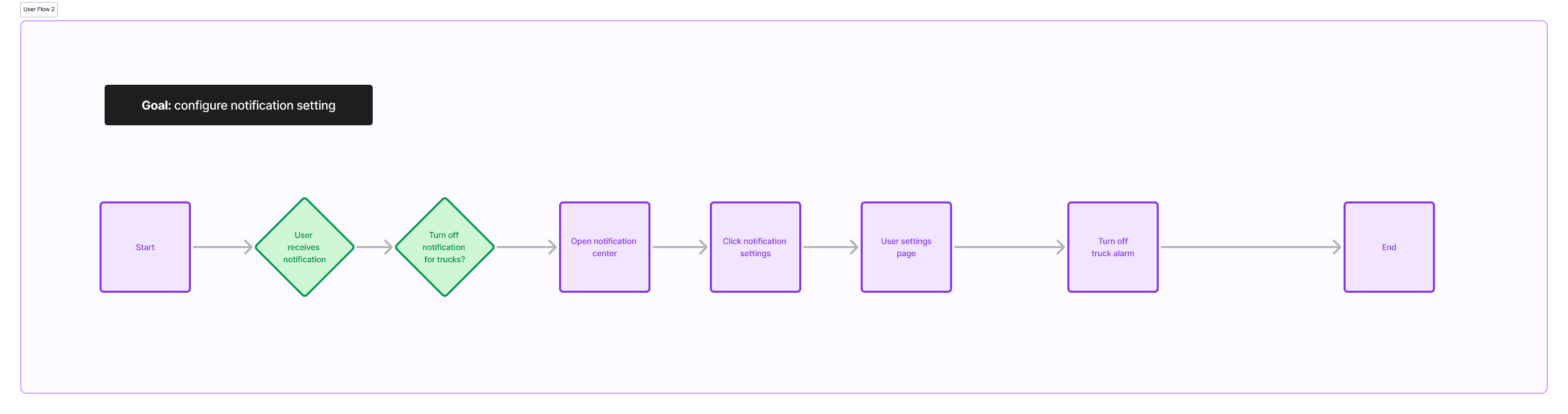
Understanding the User Flow
After identifying the problems, I intended to research how competitors' notification systems operate. However, with limited access to other mining platforms, I focused on analyzing the notification systems of platforms readily available to me to explore the overall functionality of notification centers.
After identifying the problems, I intended to research how competitors' notification systems operate. However, with limited access to other mining platforms, I focused on analyzing the notification systems of platforms readily available to me to explore the overall functionality of notification centers.
DEFINE
Bringing Ideas to Life
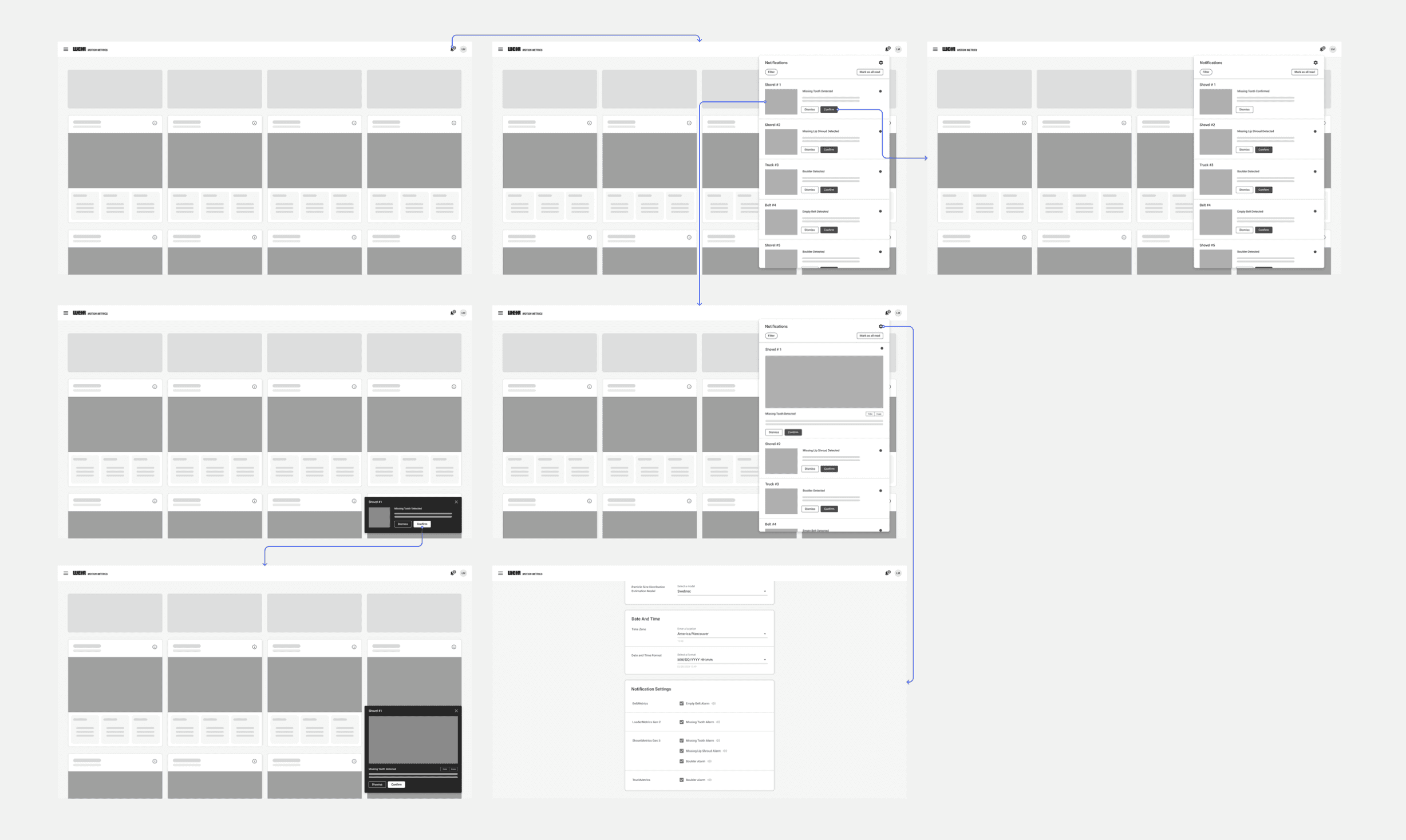
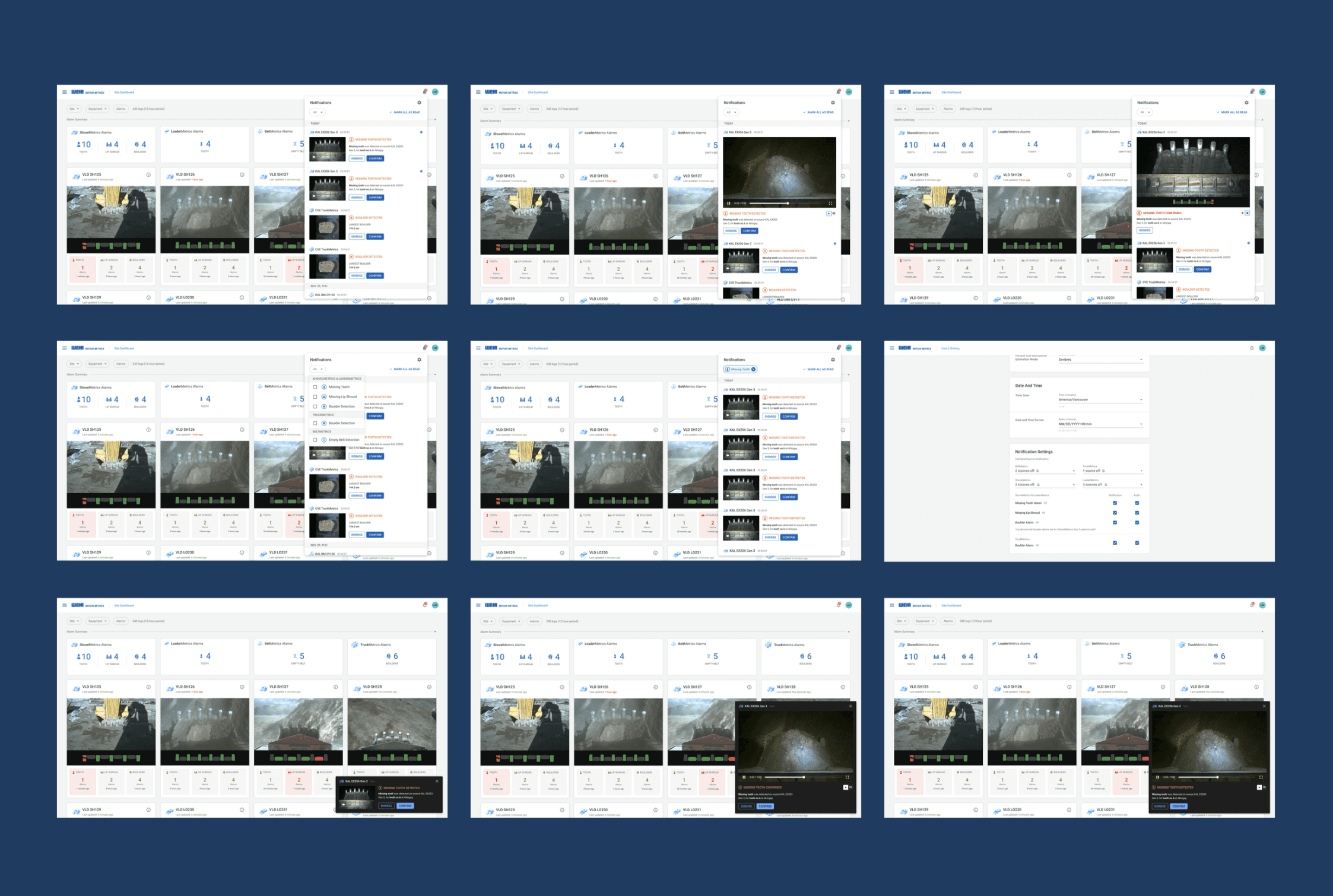
To come up with a new UI, I spent some time playing around with various concepts to accommodate functional changes that needed to be implemented. In addition to this, I was also exploring several new ideas and elements in high-fidelity design. Once I completed the high-fidelity stage, I organized a design review meeting with the project manager and the design team, during which we conducted several design iterations based on the feedback received. Following this collaborative effort, I prepared thoroughly for user testing, aimed at evaluating how users interacted with the newly introduced features and enhancements.
To come up with a new UI, I spent some time playing around with various concepts to accommodate functional changes that needed to be implemented. In addition to this, I was also exploring several new ideas and elements in high-fidelity design. Once I completed the high-fidelity stage, I organized a design review meeting with the project manager and the design team, during which we conducted several design iterations based on the feedback received. Following this collaborative effort, I prepared thoroughly for user testing, aimed at evaluating how users interacted with the newly introduced features and enhancements.
VALIDATE
Validating with Users
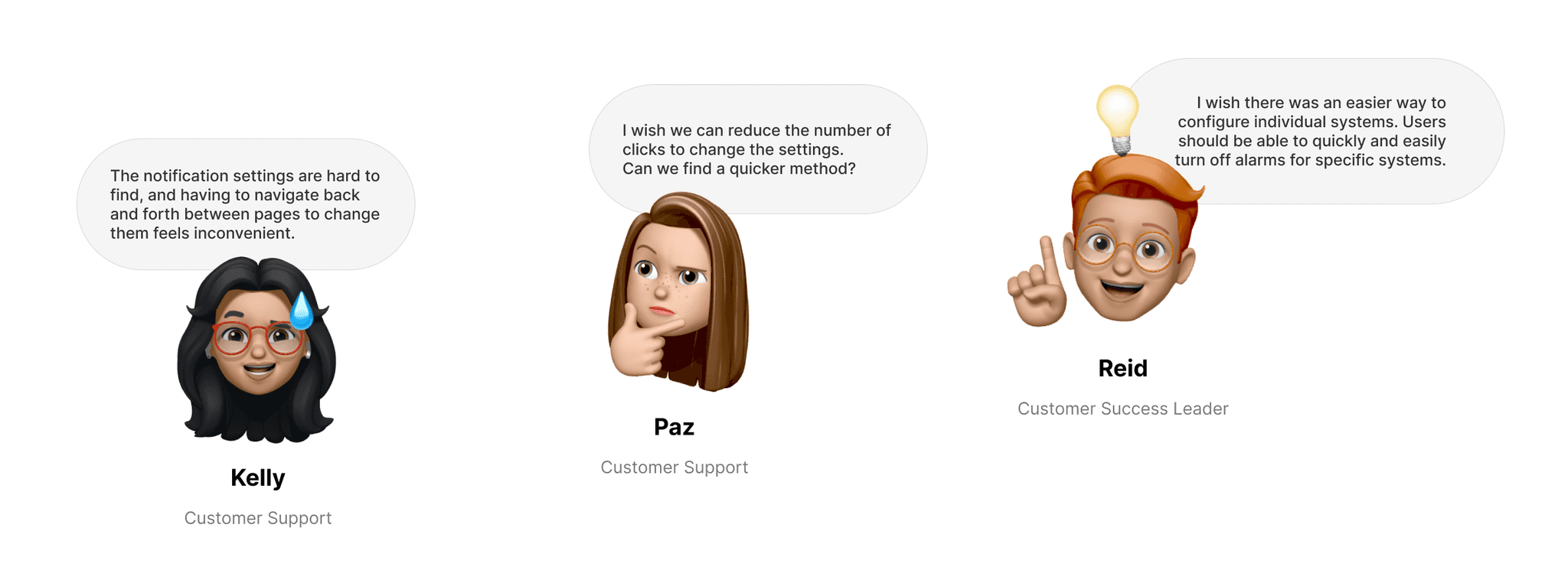
After the design iteration was completed, I made the decision to conduct a thorough user testing session focused specifically on the audio settings. This process was essential to ensure that users not only understand how to effectively use this new feature but also that they can easily locate the settings without encountering any difficulties or confusion.
After the design iteration was completed, I made the decision to conduct a thorough user testing session focused specifically on the audio settings. This process was essential to ensure that users not only understand how to effectively use this new feature but also that they can easily locate the settings without encountering any difficulties or confusion.
VALIDATE
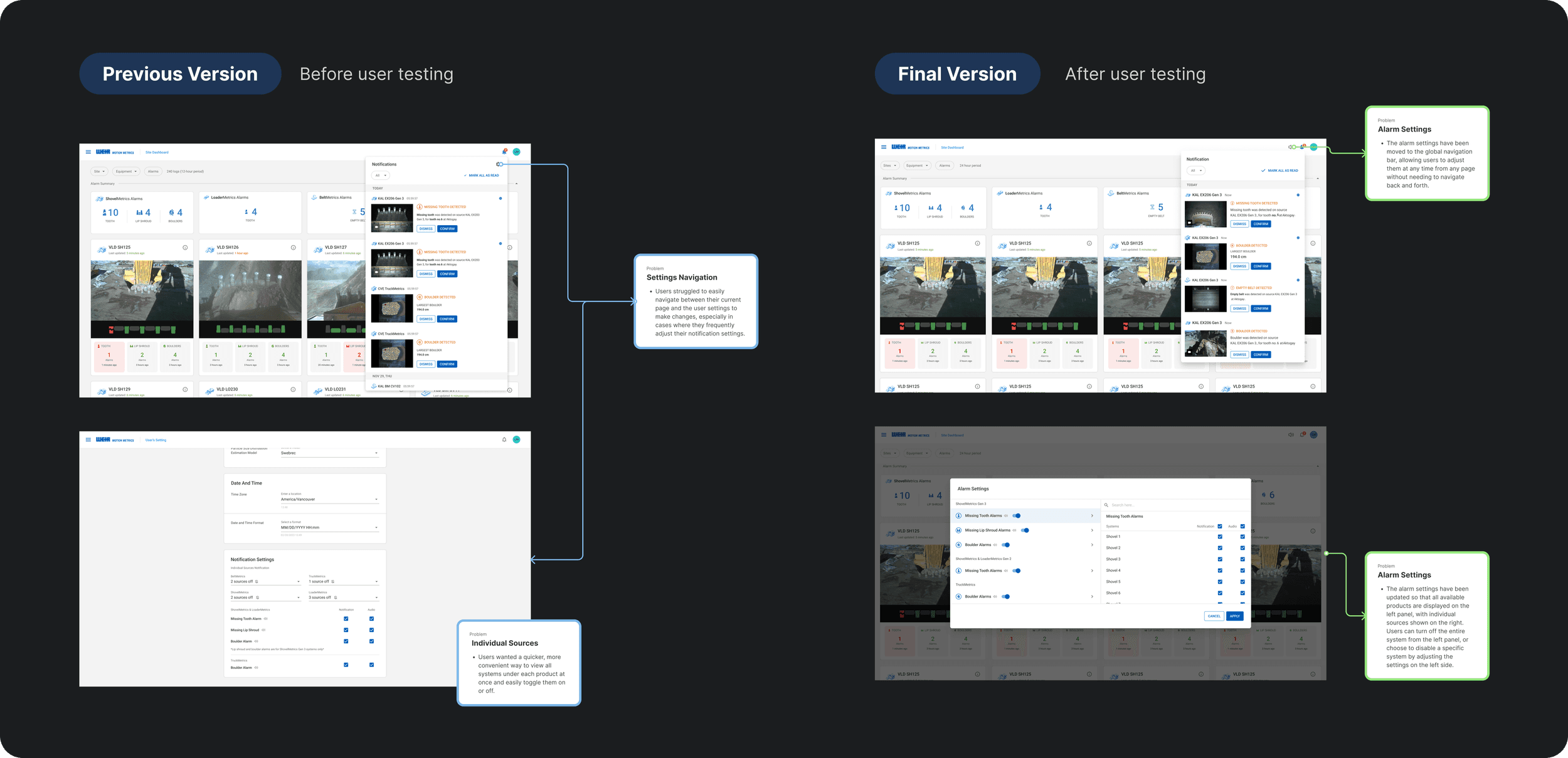
Design Improvement
Based on feedback from the user testing session and my analysis, I’ve improved the design to make it easier for users to access the alarm settings and quickly adjust the settings for individual systems.
Based on feedback from the user testing session and my analysis, I’ve improved the design to make it easier for users to access the alarm settings and quickly adjust the settings for individual systems.
Impact on Business and User 💡
Impact on Business
and User 💡
Improved Awareness and Responsiveness
The notification center improved user awareness and responsiveness by surfacing critical equipment updates in real time.
Centralized Communication
It centralized all alerts and messages, helping users stay organized and avoid missing important information.
Better Workflow Continuity
Enabling users to stay focused and make informed decisions without switching contexts.